A new customization option has arrived in SoCreate, and it’s a simple way to make your stories feel even more like yours.
You can now choose a custom color for each character in your story. If you want to give your main character a bold purple, make a supporting character bright green, or create a completely color-coded cast, you have the freedom to choose.
Character colors can also make your Story Stream easier to navigate. As your story grows and your cast gets bigger, giving characters their own colors can help you quickly find the character you’re looking for.
Choose From Ready-Made Colors or Create Your Own
Changing a character’s color only takes a few clicks.
- 1. Open a Character Profile
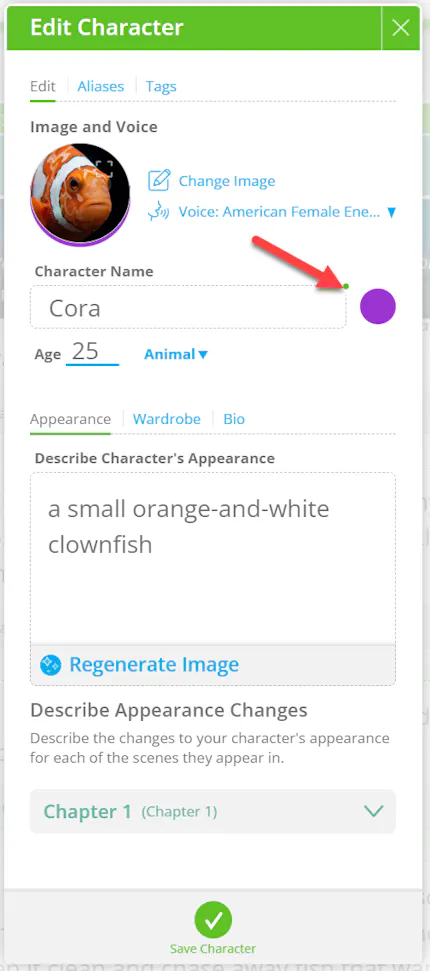
Start by opening the profile of the character you want to customize. You’ll find a small color dot that shows their current color.
- 2. Open the Color Menu
Click the color dot to open the color options. You’ll see two ways to choose a new color: Swatches and Picker.

- 3. Pick a Color
Swatches gives you a selection of colors that are ready to use. If you already have a color in mind, Picker gives you more control so you can choose exactly what you want.
See Your Characters in a Whole New Color
Once you’ve chosen your color, it will appear in the Story toolbar and throughout your character’s Story Stream.


You can give every character a different color, stick to a specific color palette, or simply choose colors you like. It’s another small way to personalize the way you build and organize your stories in SoCreate.
Open your story, choose your colors, and start making your Story Stream your own.